Vintage Typewriter Co.
Company
Shop By Category
T&Cs
Shop Online
  • Every machine checked before it ships
  • Free tracked NZ delivery over $100
  • Secure checkout with Stripe and PayPal

Wireless Typewriter Keyboard With Lever | Retro mechanical keyboard with screen | Hot swappable typewriter keyboard

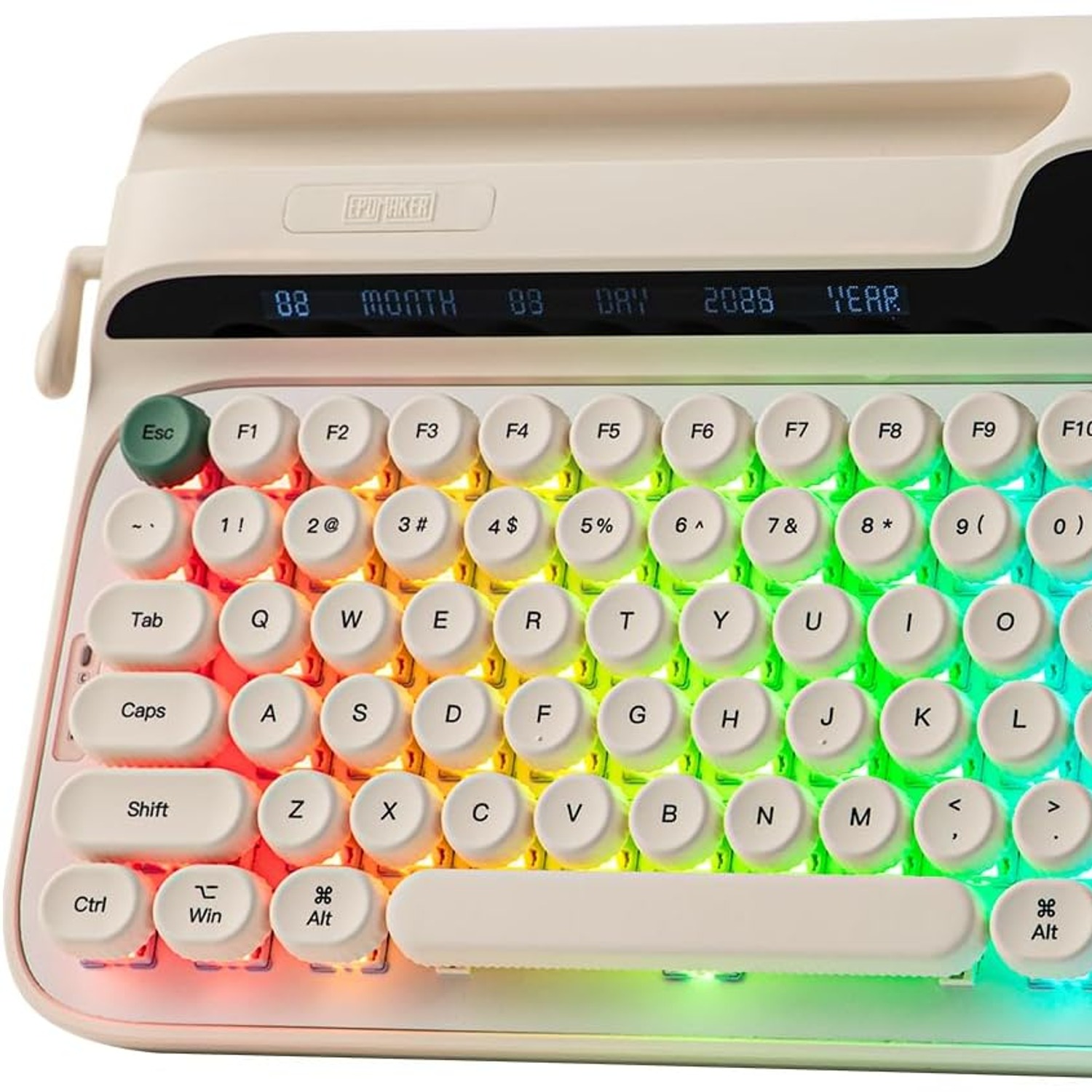
Wireless Typewriter-Style Mechanical Keyboard with Return Lever and Smart Screen

$599.99 $719.99 Save $120 inc. GST
  • Return Lever Backspace
  • Hot-Swappable Board
  • Three Connection Modes
  • Onboard Smart Screen
  • Delivery time: up to 7 working days by tracked courier, after dispatch within 2 working days
  • Free tracked NZ delivery on orders $100+, otherwise a flat $15
  • Pay by card or PayPal, handled by the payment provider
  • 14 days to change your mind, plus your Consumer Guarantees Act rights
Product specifications
Keyboard DescriptionWireless typewriter-style mechanical keyboard
Number of Keys83
Keyboard LayoutQWERTY
Switch TypeLinear
Switch ModelWisteria Linear V2
Hot-SwappableYes
Connectivity2.4GHz wireless, Bluetooth, USB wired
Compatible DevicesLaptop, PC, smartphone, tablet
Operating SystemsWindows, macOS, Android, iOS
BacklightingPer-key RGB
Extra FeaturesBacklit, ergonomic, hot-swappable, programmable keys, round keycaps
Hand OrientationAmbidextrous
Enclosure MaterialPlastic
Plate MaterialABS and aluminium
Item Dimensions (L x W x H)34.7 cm long, 5.7 cm high
StyleRetro
In the BoxKeyboard, silicone wrist rest, detachable USB-A to USB-C cable, 2.4GHz receiver (stored in the back), spare switches, 2-in-1 keycap and switch puller, pair of spare silicone feet, quick start manual and logo card
Unit Count1
Country of OriginChina
Shipping & returns

Tracked delivery anywhere in New Zealand. It is free on orders of $100 or more, and a flat $15 below that.

Changed your mind? Tell us within 14 days of delivery and send it back unused in its original packaging, and we refund the price you paid. You cover the return postage on change-of-mind returns. If it arrives faulty or is not as described, we cover everything and put it right.

Shipping details · Refunds and returns

Return Lever BackspaceA typewriter-style lever on the side works as the backspace key.
Hot-Swappable BoardChange switches by hand with the included puller, no soldering.
Three Connection Modes2.4GHz receiver, Bluetooth or USB-C cable, whichever suits the device.
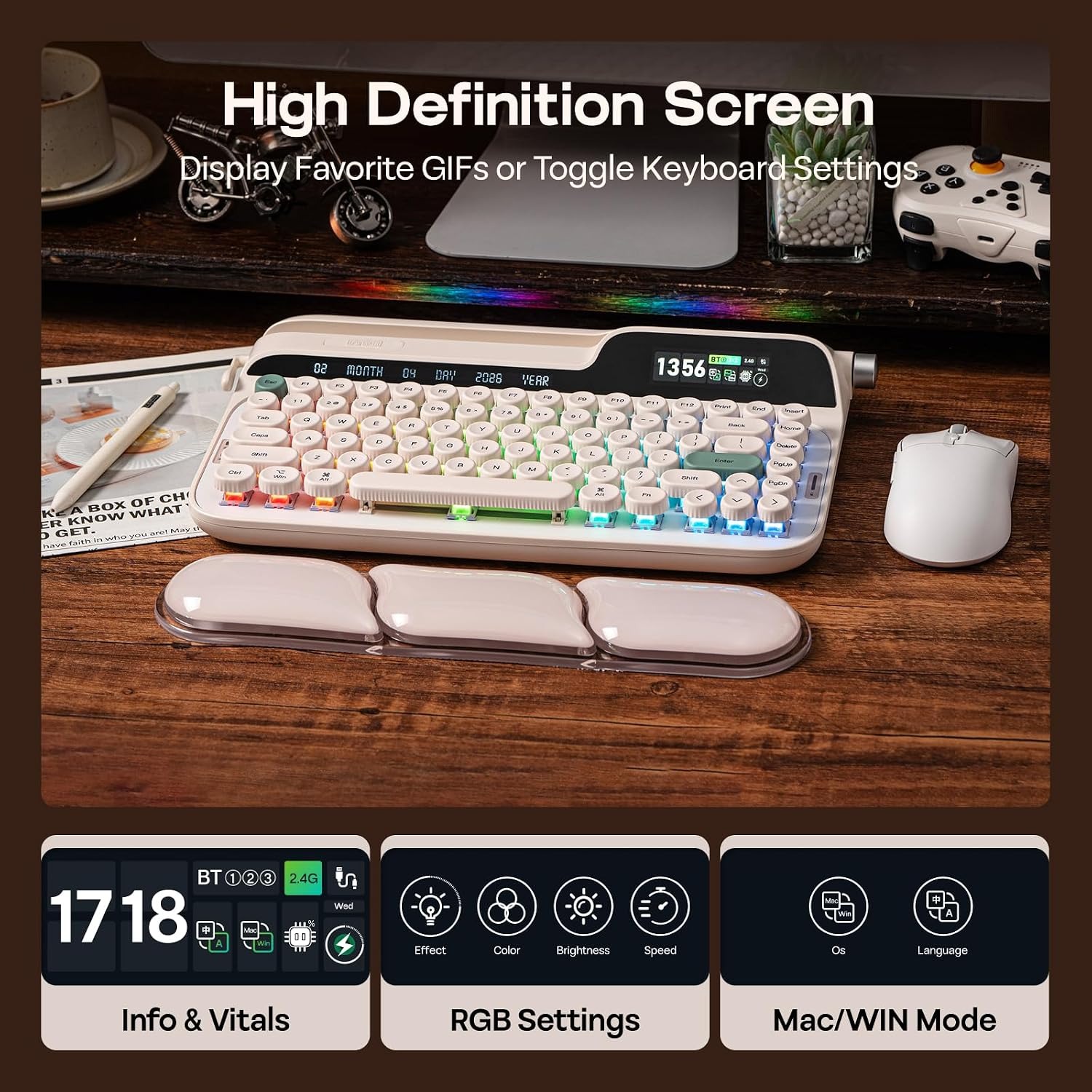
Onboard Smart ScreenShows keyboard status and time, and handles RGB lighting settings.

A wireless typewriter keyboard with lever that brings round-key charm to a desk you actually work at every day.

Eighty-three round keys, a hot-swappable board, tri-mode wireless, a rotary knob, RGB backlighting and a small onboard screen, plus a silicone wrist rest and a slot that holds a phone or tablet.

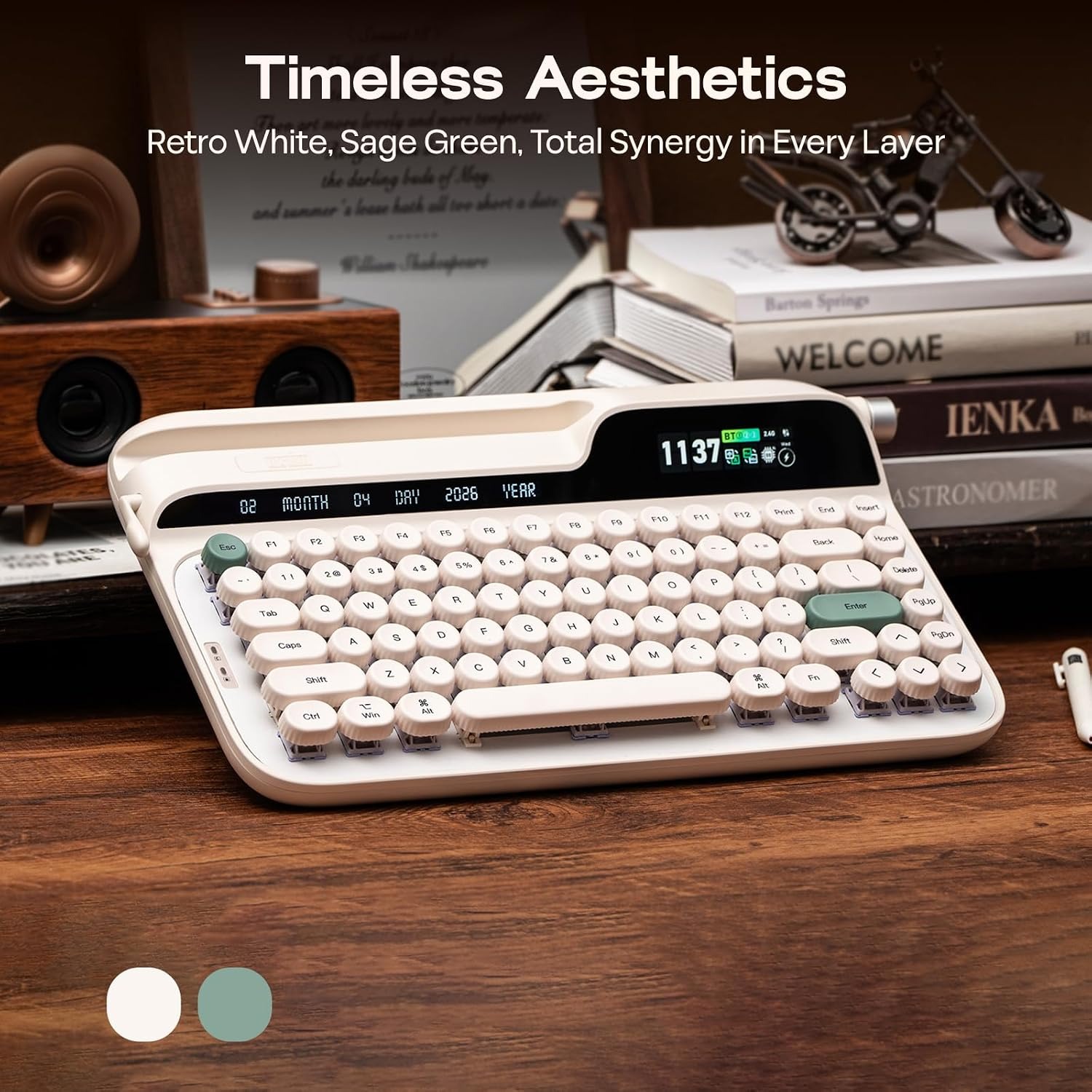
This is a modern computer keyboard built to look like an old typewriter, with 83 round keycaps set at a uniform height.

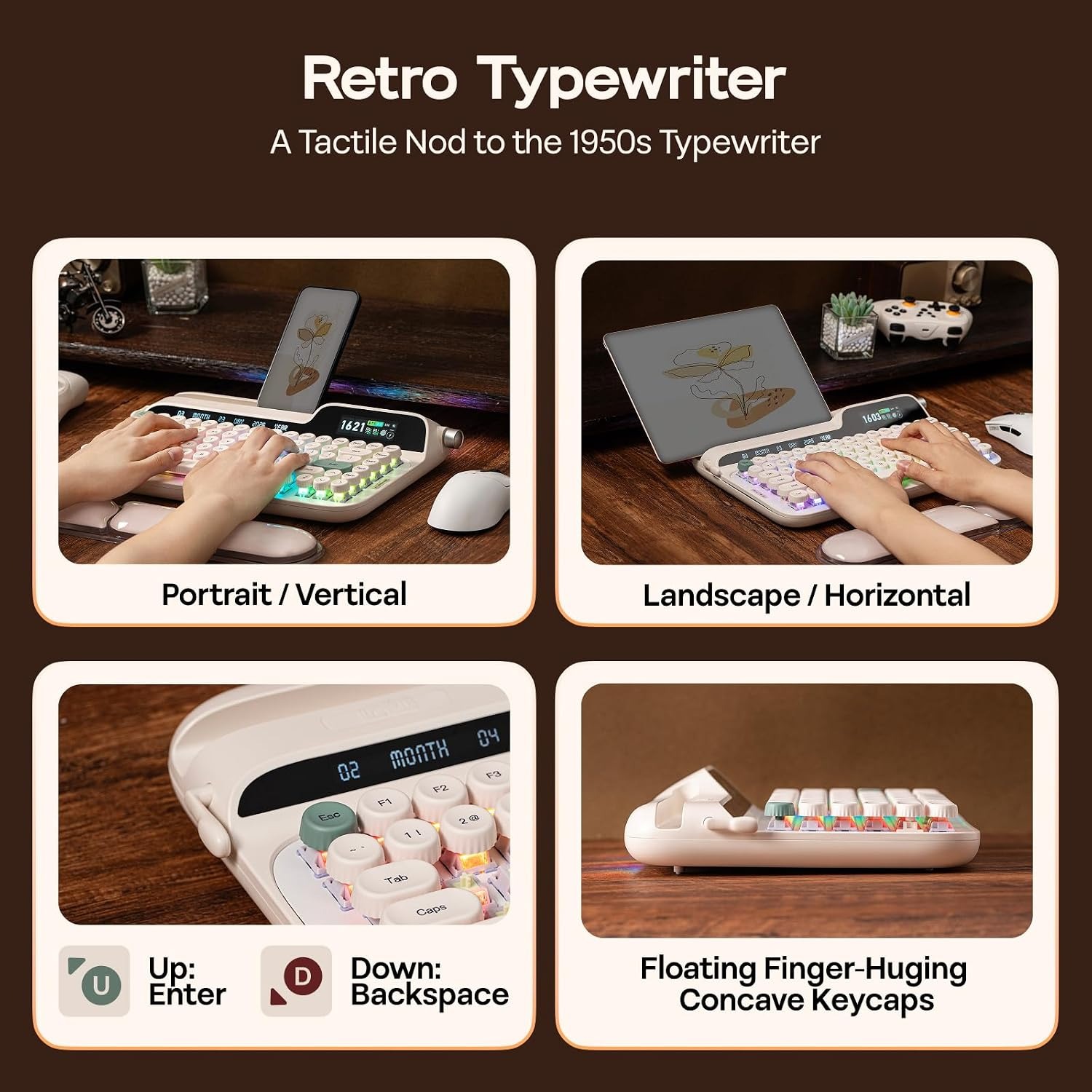
A return lever on the side acts as the backspace key, and a slot across the top holds a phone or tablet in portrait or landscape.

The board is hot-swappable, so switches can be pulled and replaced by hand using the included keycap and switch puller.

Three connection modes cover most setups, with a 2.4GHz wireless receiver, Bluetooth and a detachable USB-A to USB-C cable.

A rotary knob, per-key RGB backlighting, a small onboard screen and a silicone wrist rest round out the package.

Wireless Typewriter-Style Mechanical Keyboard with Return Lever and Smart Screen

Plenty of people love the look of an old typewriter but still need a keyboard that talks to a laptop, a phone and a work PC. This board answers that. It is a modern mechanical keyboard dressed in typewriter clothing, with 83 round keycaps, a side-mounted return lever that works as the backspace, and a case finished in a retro style. It is not a typewriter and it does not print on paper. It is a computer keyboard, and it is meant to be used as one.

Wireless Typewriter-Style Mechanical Keyboard with Return Lever and Smart Screen

The 83-key layout keeps the arrow cluster and a function row while trimming the number pad, which leaves more desk room for a mouse. Keycaps sit at a uniform height rather than the stepped rows found on most boards, and they are concave on top so fingertips settle into them. A slot runs along the top of the case and holds a phone or tablet in either portrait or landscape, which is handy if you read notes on one screen while typing on another.

Wireless Typewriter-Style Mechanical Keyboard with Return Lever and Smart Screen

Underneath, the PCB is fully hot-swappable. The board ships with Wisteria Linear V2 switches, and a 2-in-1 keycap and switch puller is included along with some spare switches, so you can change the feel of the board at the kitchen table in a few minutes. The plate is a mix of ABS and aluminium, which is a middle-ground build, firmer than a soft gasket mount and less rigid than a tray mount.

Wireless Typewriter-Style Mechanical Keyboard with Return Lever and Smart Screen

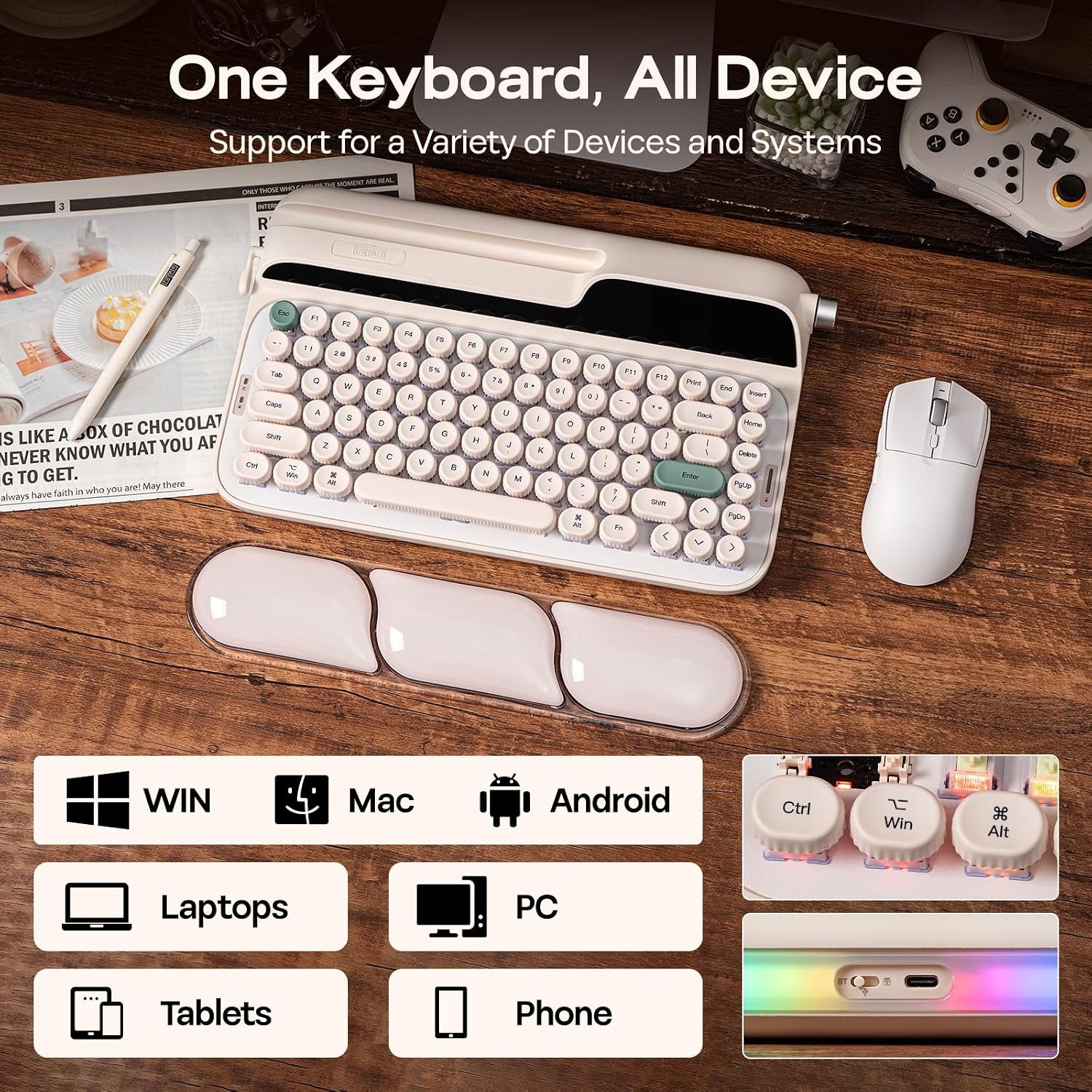
Connection is flexible. A 2.4GHz receiver tucks into a compartment in the back of the case for low-latency use, Bluetooth handles tablets and phones, and the detachable USB-A to USB-C cable covers wired work and charging. The maker lists laptops, PCs, smartphones and tablets as compatible, with Windows, macOS, Android and iOS named.

Controls are kept on the board itself. A rotary knob handles media and can be switched to drive the onboard screen, which displays keyboard status, the time and the RGB lighting settings. The per-key RGB backlighting is adjustable, and a colour-matched silicone wrist rest is supplied in the box along with a spare pair of silicone feet.

Not sure yet? That is fine.

Buying an old machine online takes a bit of faith, so we try to make it easy to say yes. Every typewriter is checked before it leaves the supplier, and if it turns up and is not what you hoped for, you have 14 days to tell us and send it back.

That sits on top of your rights under the Consumer Guarantees Act 1993, which covers you if something arrives faulty or is not as described. Read the full detail on our refunds and returns page, or ask us anything before you order.

Frequently Asked Questions

Is this an actual typewriter?

No. It is a modern computer keyboard styled to look like a typewriter. It plugs into or pairs with a computer, phone or tablet and does not print onto paper.

What does the lever on the side do?

The return lever is a nod to old typewriters, and on this keyboard it works as the backspace key. You push it the way you would push a carriage return lever, and it deletes the character before the cursor.

How many keys does it have?

Eighty-three. That layout keeps the function row and arrow keys while leaving off the number pad, which is why it takes up less desk width than a full-size board.

What are the dimensions?

The maker gives the keyboard as 34.7 cm long and 5.7 cm high. Measure your desk or tray before ordering if space is tight, and allow extra depth for the wrist rest.

How much does it weigh?

The maker doesn't give a weight. Mechanical boards of this size are generally substantial rather than featherweight, but we won't guess a figure.

What switches does it come with?

It ships with Wisteria Linear V2 switches, which are a linear type. Linear switches move straight down without a bump partway through the press.

Can I change the switches?

Yes. The PCB is fully hot-swappable, so switches lift out and new ones press in without soldering. A 2-in-1 keycap and switch puller is included, along with some spare switches.

Is this a good hot swappable typewriter keyboard for someone who has never modded a board?

It is a reasonable starting point. Hot-swap means you can try different switches with nothing more than the included puller, so there is no soldering iron and no permanent change to live with.

How does it connect to my computer?

Three ways. There is a 2.4GHz wireless receiver, Bluetooth, and a detachable USB-A to USB-C cable for wired use.

Where is the wireless receiver kept?

The 2.4GHz receiver stores in a compartment in the back of the keyboard. That is useful if you move between a desk setup and a bag.

Which operating systems are supported?

The maker names Windows, macOS, Android and iOS, and lists laptop, PC, smartphone and tablet as compatible devices.

Can I use it with a phone or tablet?

Yes, the maker lists smartphones and tablets as compatible devices. There is also a slot across the top of the case that holds a phone or tablet in portrait or landscape.

Does the slot fit a large tablet?

The maker describes the slot as holding tablets and phones in portrait or landscape without naming a size limit. Check the thickness of your case, since a bulky protective case can make a difference.

What is the screen for?

The onboard smart screen shows keyboard status and the time, and it is used to control the RGB backlighting. The maker also says it can display images and GIFs.

How do I control the screen?

The rotary knob doubles as the screen control. Using FN with the knob switches it from media mode into screen mode so you can move through the display options.

What does the rotary knob do in normal use?

In media mode it adjusts volume, and the maker notes it can be remapped, for example to skip tracks. It is a quick way to handle audio without reaching for the mouse.

Is the backlighting adjustable?

Yes. It is per-key RGB with south-facing LEDs and diffusers, and the lighting settings are handled through the onboard screen. Both dynamic and static modes are described.

Are the keys programmable?

Programmable keys are a named feature, and the maker refers to custom software for remapping and macros. Check the software details that come with the unit for the exact process.

Is this a quiet keyboard?

Linear switches are generally quieter than clicky ones, and the maker describes sound-dampening layers inside the case. It is still a mechanical keyboard, so it will not be silent in a shared quiet room.

Will the round keycaps slow down my typing?

Most people adjust within a few hours. The keycaps are set at a uniform height and are concave on top, which gives your fingertips a consistent target once the muscle memory settles.

Is there a wrist rest included?

Yes, a colour-matched silicone wrist rest comes as part of the package. There are also spare silicone feet included.

Can I change the typing angle?

The maker describes silicone feet that can be flipped to switch between a 1 degree and 2 degree incline. That is a small adjustment rather than a steep tilt.

What plate material is used?

The keyboard plate is ABS and aluminium, and the enclosure is plastic. That combination sits between a very stiff build and a very flexible one.

Is it suitable for gaming?

Gaming is one of the maker's recommended uses, and the 2.4GHz mode is intended for lower latency than Bluetooth. Linear switches are a common choice among gamers for their smooth press.

Is it suitable for long writing sessions?

Writing, programming and general office work are all among the maker's recommended uses. The uniform key height, concave caps and wrist rest are there for long sittings.

Is it left-hand friendly?

Hand orientation is ambidextrous, so the layout does not favour one hand. The lever and knob positions are fixed, so have a look at the images to see where they sit.

How do I clean it?

Power it off, brush or blow out loose debris, then wipe the case and caps with a barely damp cloth and dry it. For a deeper clean, pull the keycaps with the included puller and wash them separately in mild soapy water, dried fully before refitting.

What comes in the box?

The keyboard, a silicone wrist rest, a detachable USB-A to USB-C cable, a 2.4GHz receiver stored in the back, spare switches, a 2-in-1 keycap and switch puller, a pair of spare silicone feet, a quick start manual and a logo card.

Does it make a good gift?

It suits anyone who likes vintage design and spends a lot of time typing. The retro look, the lever and the onboard screen make it feel like a present rather than an accessory, and everything needed to use it is in the box.

What if it is not right for me?

Returns are accepted within 14 days of delivery, unused and in the original packaging. Get in touch before sending anything back so we can confirm the details, and keep the box and inserts until you are sure you are keeping it.

Choosing a Typewriter-Style Mechanical Keyboard, A Practical Buyer's Guide

6 min read Vintage Typewriter Company

The problem this keyboard actually solves

A lot of us like the way old typewriters look. The round keys, the lever, the honest mechanical feel. What we do not like is the reality of using one: no backspace, no undo, no copy and paste, and a ribbon that runs out halfway through a draft.

So people compromise. They buy a plain black keyboard because it works, and they put a typewriter on a shelf because it looks good. Two objects doing two jobs, and the one you touch every day is the boring one.

This board closes that gap. It is a modern mechanical keyboard built to look and feel like a typewriter, with 83 round keycaps, a return lever on the side, and a case with a clear retro styling. It connects by cable, Bluetooth or a 2.4GHz receiver, and it works with laptops, PCs, phones and tablets. It will not type on paper. Nothing with a USB-C port will. What it will do is make the thing already on your desk worth looking at.

How a typewriter-style keyboard works

Underneath the retro shell, this is a standard mechanical keyboard. Each key sits over its own switch, and pressing the key pushes a stem down until the switch registers. That is different to a membrane keyboard, where a rubber sheet presses onto a circuit board and the feel is softer and vaguer.

The switches here are Wisteria Linear V2, which are linear. A linear switch travels straight down with no bump partway through the press. Some people prefer that smoothness, especially for gaming, where you want a quick, clean press with nothing in the way. Others prefer a tactile bump so they can feel the moment a key registers. If you fall in the second camp, this board is still worth a look, because the PCB is hot-swappable.

Hot-swap means the switches are held in sockets rather than soldered to the board. You pull one out with the included tool and press a different one in. No iron, no solder, no risk of ruining the board. A set of spare switches and a 2-in-1 keycap and switch puller come in the box, which makes trying it out easy rather than a project.

The lever on the side is the detail most people ask about. On a real typewriter, that lever returned the carriage and advanced the paper. Here it works as the backspace key. You get the physical motion without the mechanical consequence, which is a fair trade when you want to delete a word rather than start a new line.

The screen, the knob and the slot

A few features set this board apart from a plain retro-looking keyboard.

The rotary knob handles media by default, so volume is a twist away. Hold FN while turning it and it switches to controlling the onboard screen instead. That screen shows keyboard status and the time, and it is where you adjust the RGB lighting. The maker also says it can display images and GIFs if that appeals to you.

The slot across the top of the case holds a phone or tablet, in portrait or landscape. If you work from notes on a second screen, or you keep a reference document open on a tablet while you write, that slot removes the need for a separate stand.

The backlighting is per-key RGB with south-facing LEDs and diffusers, which means the light points towards you rather than away, and it is softened rather than raw. Whether that matters depends on how you work. If you type at night, a mellower glow is easier on the eyes than a hard white LED.

Who this suits

Writers who spend hours at a keyboard and want the act of typing to feel like something. The uniform key height and concave caps mean your fingers find a consistent landing spot, and the wrist rest helps on longer sessions.

Programmers and students who work across more than one device. Three connection modes means one board can serve a desktop by cable, a laptop over Bluetooth and a tablet over the 2.4GHz receiver, with the receiver stored inside the case when it is not in use.

Gamers who want a compact board. Dropping the number pad frees up desk width for mouse movement, and the 2.4GHz mode is the one to use when latency matters.

Anyone buying a gift for a person with a tidy, considered desk. The retro look, the lever, the knob and the screen add up to something that feels deliberate.

It suits you less well if you need a number pad for data entry, if you work somewhere that frowns on any keyboard noise, or if you want the smallest possible travel keyboard. At 34.7 cm long and 5.7 cm high, this is a desk object, not a bag object.

How to choose, practically

Start with space. Measure the width you have between your monitor stand and the edge of the desk, then allow for the wrist rest sitting in front of the board. A compact keyboard still needs room to sit square.

Then think about switch feel. The board arrives with linear switches, which are smooth. If you have only ever used a laptop keyboard, linear will feel deeper and heavier at first. The maker describes the switches as factory-lubed at a 46gf mid-weight, which is heavy enough that resting your fingers will not fire a key. If you decide you want a bump, the hot-swap sockets make the change simple, and that flexibility is a large part of what makes this one of the more adaptable options if you are shopping for the best typewriter style keyboard rather than just a nice-looking one.

Then connection. If you only use one computer at a desk, wired is the simplest and most reliable setup, and the cable is detachable so you can leave it out when you do not need it. If you move between devices, Bluetooth is the easier option for phones and tablets, while the 2.4GHz receiver is the one to reach for when you want the lowest latency.

Finally, sound. Mechanical keyboards are not silent. This one has sound-dampening layers inside the case and linear switches, so it is on the quieter side of the mechanical family, but it is louder than a laptop keyboard. If you share a room with someone who works in silence, keep that in mind.

Looking after it

Keyboards collect crumbs, dust and skin oil. A quick clean every few weeks keeps it feeling right.

Power the board off first. Turn it upside down and give it a gentle shake, then use a soft brush or a puff of air to clear what is between the keys. Wipe the case and the tops of the caps with a barely damp microfibre cloth and dry it straight away. Never pour liquid onto the board.

Every few months, pull the keycaps with the included puller and wash them in warm water with a drop of dish soap. Let them dry completely before they go back on. While they are off, that is your chance to clear the plate properly.

Keep it out of direct sunlight, which can fade plastics over time, and store it somewhere dry. If you use the wireless receiver, drop it back into the compartment in the back of the case when you travel so it does not go missing in a bag.

The short version

This is a computer keyboard that looks like a typewriter, and it is honest about being exactly that. Eighty-three round keys, a return lever that works as the backspace, a hot-swappable board with Wisteria Linear V2 switches, per-key RGB, a rotary knob, a small onboard screen and a slot for a phone or tablet. It connects three ways and works with laptops, PCs, phones and tablets.

Buy it if you spend real hours at a keyboard and want that time to feel better. Skip it if you need a number pad or absolute silence. The maker doesn't give the weight or colour, so if either is a deciding factor for you, ask us before you order and we will check.

Browse all typewriters

Not sure if the round keys will suit you?

Send us a message with how you type and what you type on, and we will tell you honestly whether this board is a good match.

Ask us a question

Page summary

A wireless typewriter-style mechanical keyboard with 83 round QWERTY keycaps, a side return lever that works as the backspace, and a slot that holds a phone or tablet. The PCB is hot-swappable and ships with Wisteria Linear V2 linear switches. Connection is tri-mode, covering a 2.4GHz receiver stored in the case, Bluetooth and a detachable USB-A to USB-C cable, with laptops, PCs, smartphones and tablets listed as compatible and Windows, macOS, Android and iOS named as operating systems. Features include per-key RGB backlighting, a rotary knob, an onboard screen showing status and time, programmable keys, and an ABS and aluminium plate. Measures 34.7 cm long and 5.7 cm high. Box includes a silicone wrist rest, spare switches, a keycap and switch puller and spare feet. Weight and colour are not specified.